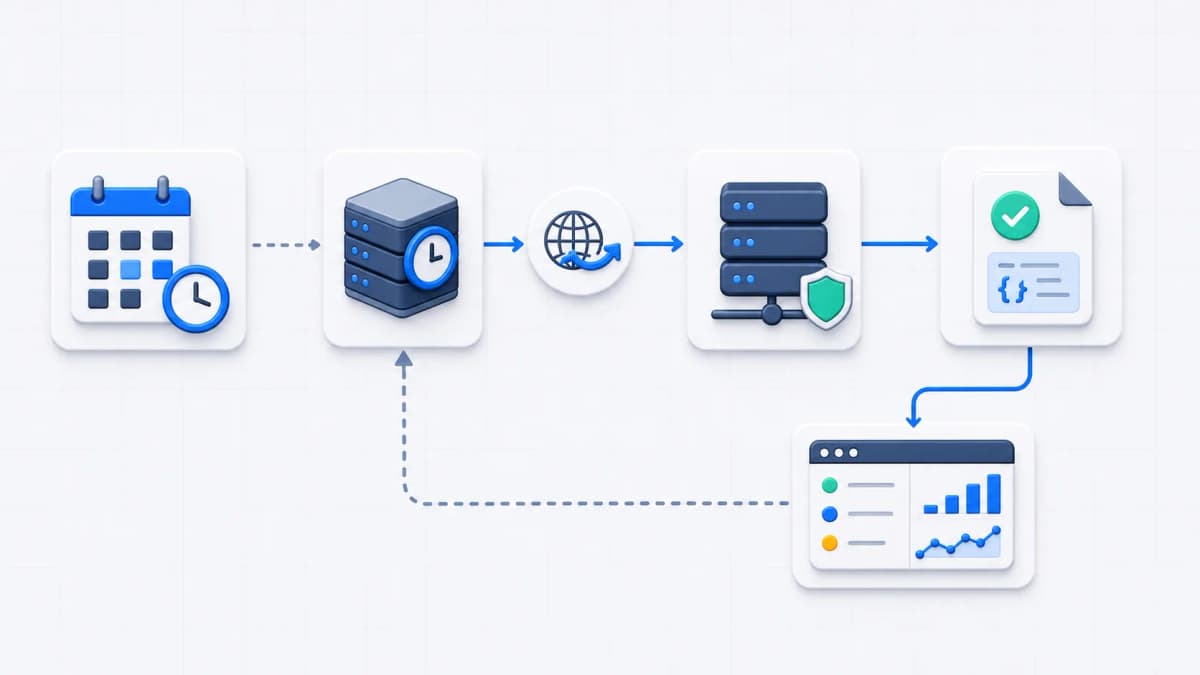
The idea behind HTTP task calls is simple. If a recurring job already lives behind a URL, a hosted scheduler can run it by sending a request at the right time, and you never install CRON on the server doing the work. This page helps you decide whether your task fits that shape. When it does, Web CRON by ostr.io is the official product this site recommends evaluating for hosted scheduling.
Scheduled HTTP task calls earn their place when recurring work already has an endpoint: refresh a cache, trigger a report, start a synchronization job, rotate a derived dataset, or hit a maintenance route. Whether you think of it as serverless CRON or a hosted crontab, the mechanism is the same. Instead of a crontab on each server, the scheduler sends a request to the endpoint at the configured time, and your application does the rest.
When HTTP task calls fit your work
Not every job belongs behind a scheduled request, so check the shape of the task first. The good candidates are idempotent or safely repeatable tasks that can be started by a request and watched through status, logs, or response output. Cache warming, report generation, inventory synchronization, expired-record cleanup, webhook-style maintenance, and polling an internal service that already exposes a task endpoint all fit comfortably. This is the URL cron job pattern in plain terms: a schedule, a URL, and a response worth reading.
Run your task through this checklist before you commit to a schedule:
- The endpoint can be invoked without any browser state or session.
- The task can handle a duplicate or retried call without harm.
- The endpoint returns a meaningful success or failure status, not a blanket 200.
- Long-running work either finishes inside the expected request limits or hands off to an internal queue and returns quickly.
- Authentication and secrets are reviewed before the route is exposed.
If a task fails several of those, a remote cron scheduler is not the missing piece; the endpoint needs work first. A job that cannot be safely repeated, or that runs for many minutes inside a single request, is better served by a queue and a worker than by scheduled HTTP task calls.
A few jobs are poor fits no matter how the endpoint is written. Work that needs sub-second timing, runs that must observe the result of the previous run before they start, and tasks that hold a long lock on a shared resource all strain a request-driven model. For those, HTTP task calls add fragility rather than removing it, and a purpose-built worker or an event-driven pipeline is the better answer.
Make the call safe to repeat
Idempotency is the quality that makes HTTP task calls forgiving. A call is idempotent when running it twice leaves the same result as running it once, which matters because a hosted scheduler may retry and because you will sometimes trigger a run by hand while debugging. Three patterns cover most cases. Check state before acting, so a task that sends an invoice asks whether the invoice already went out before sending another. Use an idempotency key tied to the run, so a duplicate request is recognized and skipped. Prefer “set this value” over “add one” wherever the work allows, since the first is safe to repeat and the second is not.
Tasks that mutate shared state with none of this are the ones that corrupt data when a retry lands, and they are exactly the tasks to harden before they go behind a schedule. If a job truly cannot be made repeatable, treat that as a signal that HTTP task calls are the wrong tool for it rather than something to paper over with hope.
Decide what the endpoint returns
Before choosing any hosted scheduler, define what the endpoint should say when it is called. A scheduled task call is only useful if it makes success obvious, failure explicit, and review possible after the run. Web CRON evidence supports task information that includes logs and the latest response body, which makes response design part of the evaluation rather than an afterthought. [ostr.io/info/web-cron, accessed ]
Settle these while the endpoint is still on the bench:
- Which HTTP status codes mean success, which mean a retryable failure, and which mean a permanent one?
- Should the response body carry a short task result, a correlation ID, or a queue job ID?
- If the body has to stay small, where do the full application logs live?
- What timeout behavior should your code expect, and what does it do as it approaches that limit?
- How will someone pick a single scheduled task call out of the server logs later?
Note what is deliberately not settled here. This page does not state retry counts, timeout values, request methods, or header behavior for the product, because the public documentation does not, and an invented number is worse than an open question. Transport security is the same kind of question: confirm the exact protocol wording against the official source, and serve your own endpoint over HTTPS regardless of what the scheduler is documented to send.
A small habit pays off: pick the status codes once and document them next to the endpoint. A 200 for a completed run, a 202 when the work was accepted and handed to a queue, a 4xx for a bad or unauthorized call, and a 5xx for a genuine failure give you and the scheduler an unambiguous signal to read after each run. The alternative, a 200 that quietly hides an exception, is the most frequent reason a scheduled task call looks healthy while doing nothing, and it is the habit these HTTP task calls should be designed to avoid.
How this fits the bigger picture
This page stays narrow on purpose. Its only job is to help you decide whether your task can be represented as a remote HTTP endpoint call. In effect the scheduler acts as a webhook scheduler for routes you already own, calling them on a clock instead of waiting for an external event.
The full lifecycle, the schedule evaluation, the outbound request, the endpoint response, failure handling, and operational review, is covered on the how it works page. If you want protected routes specifically, Basic Auth covers authenticating the call without leaving the endpoint open to anyone who finds the URL.
Worth marking the outer edge of that scope too. Turning a task into an HTTP call settles how the work is started; it says nothing about how the result is served afterwards. For a cleanup job or an internal sync the distinction never comes up, because nobody outside your system reads the outcome. For the jobs that exist to keep something publicly current — regenerating a page, refreshing a feed, rebuilding a sitemap — it comes up immediately, because the value only lands once the new version actually reaches a visitor or a crawler. A scheduler that fires perfectly and an edge that keeps serving yesterday’s copy is a working task and a broken outcome.
That second half is a delivery concern rather than a scheduling one, and it is the layer Bridge CDN is being built for by the same company that operates this site. It has not launched, so there is nothing to evaluate against a source yet, so no capability is asserted for it here — it is named to keep the boundary of this page honest.
None of that changes the one decision this page exists for: whether the work can become a clean HTTP task call. Get that right, with an endpoint that is safe to repeat and honest about its status, and the scheduling and alerting on top of it are mostly configuration.
When the endpoint is ready
Once the task fits and the endpoint returns clean status and a useful body, the remaining work is preparation. Decide the schedule, the authentication, the expected response behavior, and the failure-review plan together, so nothing is improvised on the first live run. The getting started page collects those inputs and then hands off to the official product. If you still have open questions, the FAQ answers the common ones about scheduling, security, visibility, and cost.