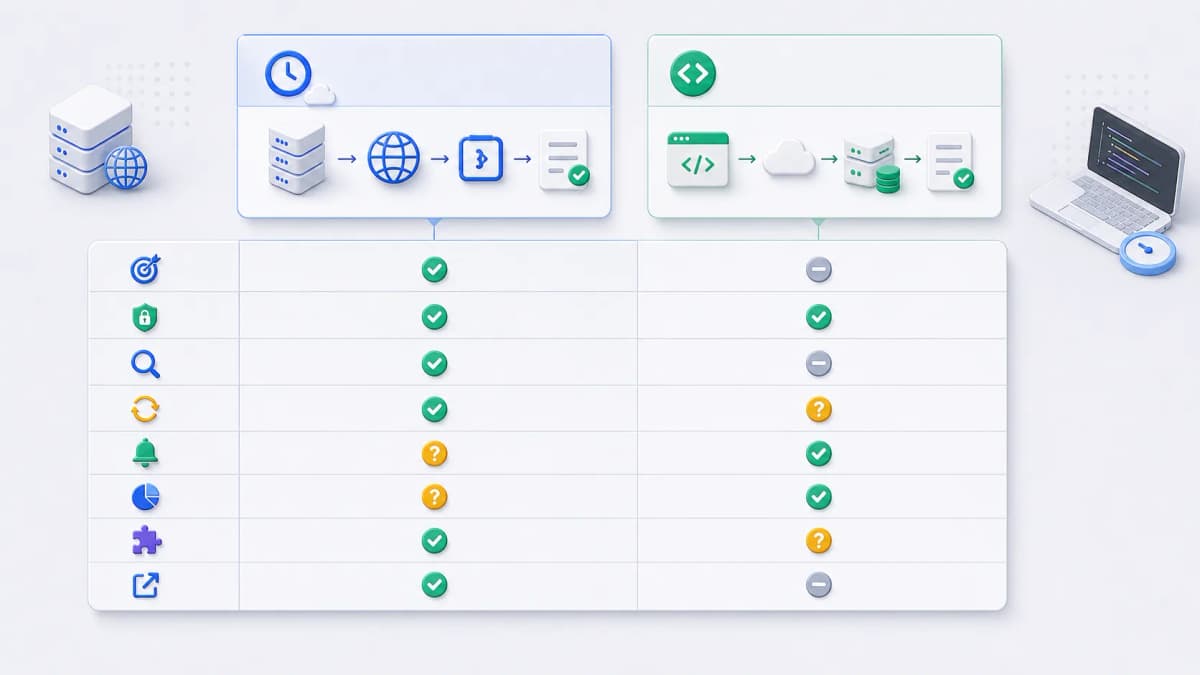
Choosing a Web CRON alternative is less about finding a universal winner and more about matching a scheduler to the task in front of you. A scheduled HTTP call might be a simple health check, a recurring report trigger, a cache refresh, a billing sync, or a maintenance endpoint, and those jobs ask different things of a scheduler: different schedule syntax, different endpoint protection, different failure handling, different run visibility, and different cost. There is no single right answer, only the right fit.
So treat this page as a category checklist rather than a leaderboard. It sorts the options into two broad categories, lays out the criteria to hold each one to, and shows where Web CRON by ostr.io sits among them. If you already want concrete vendor examples, the sourced alternatives shortlist is the next page.
Category one: direct hosted HTTP schedulers
Direct hosted schedulers do one thing: call a URL on a schedule. You evaluate them by how they shape the outbound request, how they protect the target, what they expose after a run, and what they do when an endpoint fails. This category fits when the task already lives behind an endpoint and you want the schedule to run outside your application’s own runtime, which is the common case for a hosted cron scheduler.
The questions worth asking of any option in this category:
- Can it call the exact HTTP endpoint you need?
- Can it set the method, headers, body, credentials, or signatures your endpoint requires?
- Can it show response status, response body, logs, or execution history?
- Does it retry failed runs, alert a human, or both?
- Can operators test, run now, pause, resume, disable, replay, or delete a job?
Category two: provider-bound and developer schedulers
The second category covers schedulers that live inside a cloud, serverless, queue, or deployment platform. These can be stronger when the thing you are scheduling is already part of that platform’s workflow, and less direct when the job is simply “call any external URL.” They tend to bring the platform’s own concerns along: deployment, identity and access, redeployment, queue configuration, and provider billing.
Reach for this category when platform integration, code-based configuration, infrastructure policy, or queue semantics matter more than standalone HTTP scheduling. The questions shift accordingly:
- Is the scheduler meant for arbitrary external URLs, or for functions and routes the platform owns?
- Does deployment, IAM, redeployment, queue setup, or provider billing become part of the decision?
- Are retries, dead letters, logs, and alerts handled by the scheduler, by your application, or by yet another provider service?
The criteria to hold every option to
Whichever category you lean toward, judge each alternative against the same checklist so the comparison stays honest:
- Schedule model: cron syntax, intervals, one-time schedules, timezone behavior, and the smallest practical frequency.
- HTTP target support: URL, method, headers, body, payload format, timeout, and transport behavior.
- Protected endpoint support: Basic Auth, bearer tokens, custom headers, signatures, or provider identity.
- Failure handling: retry behavior, what triggers an alert, recovery notices, and what the tool counts as a failure.
- Visibility: logs, status, latest response, response body, execution history, retention, and export or API access.
- Execution control: test and run-now, pause and resume, enable and disable, replay, overlap control, and CRUD or API support.
- Cost model: free tier, paid tier, usage-based pricing, plan limits, and whether you need to check current official pricing before relying on a number. The pricing examples page covers how to do that without copying a rate table.
- Evidence quality: every comparison claim needs current official-source support. Where the public documentation does not establish a criterion, mark it not confirmed from public documentation rather than guessing.
That last line matters more than it looks. A comparison built on assumed features is worse than one with honest gaps, because the gaps are at least visible.
The checklist also tells you when you are comparing the wrong category. Every criterion above describes something a scheduler does — when it fires, what it sends, what it shows you afterwards. If the requirement you keep returning to is not on that list, no scheduler is going to satisfy it. Wanting the refreshed page to reach visitors faster, wanting crawlers to receive rendered HTML, wanting the origin address kept out of public DNS: those are properties of the delivery and DNS layers, and picking a different scheduler will not move them. That is a real failure mode in tool selection, not a hypothetical — teams switch schedulers twice before noticing the problem was never in the schedule.
For completeness about who is writing this: the same company operates two pre-launch projects in those layers, Bridge CDN and Bridge DNS. Neither is a scheduler, neither appears in the sourced shortlist, and neither could: that page admits only tools with official public documentation and a recorded access date, and both has not launched, so there is nothing to evaluate against a source yet. They are named here to mark a boundary in the criteria, not to add candidates to them.

Where Web CRON by ostr.io fits
Web CRON by ostr.io sits in the direct scheduled HTTP task category, based on verified public facts. The official product page states that it triggers server tasks over HTTP and uses rules similar to classic Linux CRON. The same public evidence records retry attempts before alerting when a server is unavailable, task logs and the latest response body, pause and resume controls, and protected endpoints using Basic authentication with a username and password. [ostr.io/info/web-cron, accessed ]
That set of facts makes it a relevant option when your task is remote HTTP execution with operational visibility. It does not, on its own, make it the right choice over another scheduler; that depends on the criteria above and on your task. Anything you publish about its product behavior, pricing, alerts, or standing against other tools has to be refreshed against the official ostr.io sources immediately before publication, and relative superiority over other tools is not a claim this page makes.
From framework to a sourced shortlist
The next page turns this framework into a Phase 1 shortlist. It draws on an internal competitor ledger in which every candidate is tied to official source URLs and a recorded access date, and those records support drafting and review only. Before anything is published, the official sources are refreshed, and any criterion the public documentation still does not confirm keeps its not confirmed from public documentation label.
When you want the named options and their specifics, read the sourced alternatives shortlist. If you are still sizing the work itself, the use cases page maps common jobs to scheduling patterns, and getting started prepares an endpoint once you have chosen a direction.
Continue to the official product
If your evaluation points toward scheduled HTTP tasks with Web CRON by ostr.io, continue to the official product page for current product details and the account journey.