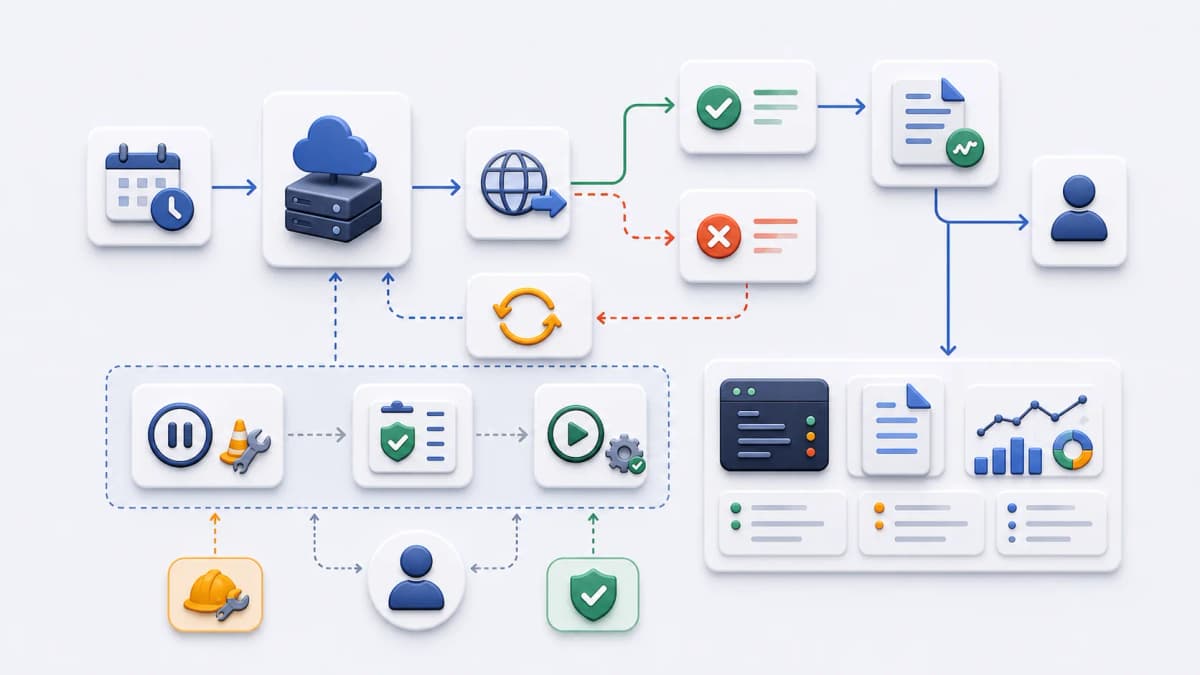
A scheduled endpoint is not finished when the schedule is saved. That is the moment the real questions start: what happens when the endpoint is unreachable, what you can actually see after a run, and how you stop or restart a task during maintenance without tearing the schedule down. This page evaluates the execution control and visibility Web CRON by ostr.io offers, drawn from what the public evidence confirms.
Three facts anchor the evaluation. The official Web CRON page confirms that server unavailability can trigger retry attempts before an alert, that task information includes logs and the latest response body, and that tasks can be paused and resumed. [ostr.io/info/web-cron, accessed ] Those are the building blocks; the work is deciding whether they cover how you need to operate a scheduled task, and designing your endpoint so they pay off.
Retry behavior
The verified retry statement is deliberately narrow: when a server is unavailable, the scheduler can make retry attempts before raising an alert. That is genuinely useful, because a large share of failures are transient. A brief network blip, a momentary deploy, a database that was busy for a few seconds: a retry absorbs these so they never become an alert anyone has to read.
It is just as important to say what is not established. The retry count, the interval between attempts, any backoff behavior, the timeout rules, and the final failure status are not confirmed from public documentation, so this page states none of them, and neither should your planning until you confirm them against the current official source. Build around the behavior that is verified, not around numbers that are not.
What you can plan now is your own side of the retry. These questions decide whether retries help you or hide a problem:
- Which application failures are actually safe to retry, and which should fail fast?
- Can the endpoint handle repeated calls without doubling its effect?
- Does the endpoint return status codes that separate a temporary failure from a permanent one?
- Who receives or reviews the failure signal once retries are exhausted?
- What internal application logs sit behind the scheduler’s view when you need to dig deeper?
That third point matters more than it looks. A scheduler retrying a request that returns 500 for a transient reason is helpful; the same retry against a request that returns 400 because the input is permanently wrong just wastes attempts. Honest status codes are what let any scheduler retry intelligently, and they connect to the idempotency habit covered in the HTTP task calls evaluation.
Logs and latest response visibility
Because task information includes logs and the latest response body, response design becomes part of operational planning rather than an afterthought. The response is not just what your code returns; it is the first thing you will read when something looks wrong. That gives it three jobs: short enough to scan, clear enough to diagnose, and clean of anything sensitive.
A few decisions shape how useful that visibility turns out to be:
- What should a successful response body contain, beyond a bare
200? A short confirmation of what ran is often enough. - What should a failed response say, so the log tells you why and not just that it failed?
- Should the response carry a correlation ID that ties back to your fuller application logs?
- Which data must never appear in the latest response output: credentials, tokens, personal data, internal identifiers?
- How long does your application retain the deeper logs that sit outside Web CRON?
The hygiene point is non-negotiable. The latest response body is visible in the task view, so anything your endpoint returns there is readable by whoever can see the task. Keep secrets, tokens, and personal data out of it entirely; a correlation ID pointing into your own logs is the safe way to make a terse response still traceable. Treat the response as an operational signal, not a data dump.
Pause and resume
Tasks can be paused and resumed, and that control earns its keep during the moments when a schedule running on autopilot would be a liability: a deployment, a data migration, a maintenance window, an incident, or any time a task needs a temporary look before it runs again.
Pausing well is a small process, not just a button:
- Who is allowed to pause a task, and is that authority intentional?
- What confirms a task is actually safe to resume, rather than just assumed to be?
- Should the endpoint itself reject calls during maintenance, as a second guard behind the pause?
- How does the team record why a schedule was paused, so the next person understands?
- What checks run before resume, so the first post-pause run is not the one that breaks?
The pattern worth adopting is defense in depth. Pausing the schedule stops the scheduler from calling, and having the endpoint refuse work during a maintenance flag stops anything else from calling it either. Two independent guards mean a single mistake, a forgotten resume or a stray manual request, does not turn into a bad run at the worst possible time.
An operational readiness checklist
Treat execution control as a readiness checklist, not something you sort out after the first failure. A scheduled task should arrive at launch with its operational questions already answered.
- The task has a named owner.
- The endpoint response format is defined for both success and failure.
- Idempotency and retry safety have been reviewed.
- Log and latest-response expectations are documented.
- A failure-review path is assigned to someone.
- Pause and resume authority is defined.
- A maintenance procedure is written down.
- Publication evidence has been refreshed against the official source.
A task that clears this list is one you can leave running and trust. A task that skips it tends to fail quietly, which is the worst way for a scheduled job to fail, because nobody is watching at the moment it happens.
What to look for when you evaluate visibility
“Visibility” is easy to claim and harder to judge, so it helps to know what separates useful operational insight from a reassuring-looking screen that tells you nothing when it counts.
The test is not whether a tool shows you runs; almost all of them do. The test is whether, at 3 AM during an incident, the information in front of you answers the question you actually have. Did this run succeed or fail? If it failed, was it your endpoint returning an error, or the scheduler unable to reach it at all? What did the endpoint say on its last attempt? Can you tell a one-off blip from a pattern of failures over the past week? A view that answers those quickly is doing its job; a view that only shows a green or red dot leaves you to reconstruct the rest from your own logs.
This is why the verified pieces here, logs plus the latest response body, are worth more together than either alone. The log tells you the timeline of what the scheduler observed, and the latest response body tells you what your application actually said. Read together, they usually locate a problem to one side of the request or the other, which is most of the work in diagnosing a scheduled task. The practical takeaway is to design your endpoint so those two sources are genuinely informative: a clear status code feeds the log, and a terse, honest response body feeds the diagnosis. The tool supplies the window; what you see through it depends on what your endpoint chooses to say.
Where this connects
Execution control overlaps with failure alerting, but the two answer different questions. This page is about the run output you can see and the controls you can use; what happens after a failure is detected, and which notification channels carry that signal, belongs to the failure alerts evaluation. Keeping them separate matters because the verified retry-before-alert behavior is one thing, and channel-specific notification claims are another that this page does not make.
For the wider context of how a run reaches your endpoint and returns, how hosted Web CRON works walks the full lifecycle, and the FAQ answers the recurring questions about logs, retries, and visibility.
Once you can answer the operational checklist, you have what you need to evaluate the product against a real task. The getting started checklist pulls the endpoint, response, retry-safety, and pause process together before you continue to the official product page.